"Send Me the Invoice" or "The Invoice Is Wrong"? A Request Detector
How our support bot spots customers asking for a document or a number, why keywords alone were wrong a quarter of the time, and the nine rules that fixed it.
Customers in our support chat ask for four kinds of paperwork: a statement of everything they ordered last month, a delivery invoice, a card receipt, or just a number (“how much did we spend in September?”). Support agents used to look each one up and type the answer. This post is about the bot that now spots those requests and prepares the answer for one click, and mostly about the part that took longer than everything else: telling a customer who wants the invoice from a customer who is complaining about the invoice.
There is no model in the detector. It’s a page of regular expressions with a lot of comments, measured against every customer message we have. I’ll show the rules, the numbers, real sentences going through it, and what the Slack side looks like when it fires.
The job, and why it stops at Slack
The detector reads each new customer message in the support chat (the bot polls the chat platform once a minute) and decides one of five things:
| Verdict | What the bot prepares |
|---|---|
| Statement of orders | The monthly spreadsheet, emailed (the statement bot) |
| Delivery invoice | The invoice PDF from the order system |
| Card receipt | The card receipt from the order system |
| How much did we spend | A short reply in the chat with the totals |
| Nothing | Leave it to the agent |
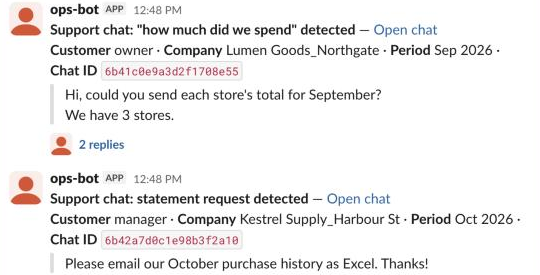
Whatever it decides, nothing goes to the customer automatically. It posts a card in Slack with the customer’s own words, and the answer waits under it for a person to approve. That one decision shaped everything else: the detector’s job is to save typing, not to be right. A wrong card costs one click on Cancel. A wrong email to a customer costs a phone call and an apology. So the detector can afford to be a little eager, and the gate catches the rest. The general pattern is in Slack approval buttons for AI bots.
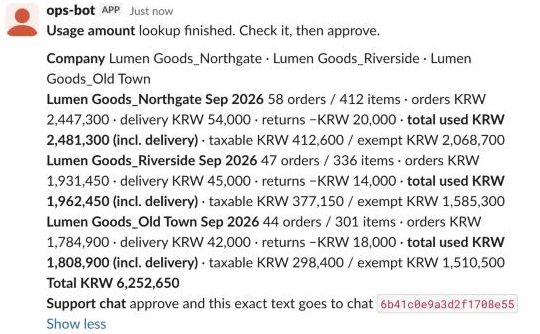
Here’s what it posts, re-created in a test Slack workspace with invented companies (the layout is the production one):
Version one: keywords
The first version did what anyone does. If the message contains the word for “statement”, it’s a statement request. “Invoice”, invoice request. “Card receipt”, receipt. “Payment amount” or “total”, an amount question. Priority runs receipt, then invoice, then statement, then amount, so “card statement” is a receipt and “the statement and the total, please” gets the statement (the spreadsheet has the total in it anyway; a document always answers more than a number).
It went live on 2 September. On 10 September I replayed it over every customer message we had stored, 7,216 at the time, and read every hit.
67 hits. 18 were wrong. That’s more than one in four. The worst type was the delivery invoice: 8 of 12 were not requests at all.
They weren’t random mistakes, either. Read them in a row and they sort themselves into a few shapes:
- “One item never arrived. It’s on the invoice though.” The invoice is evidence. The customer wants the missing item, not a PDF.
- “The delivery fee will show in the payment total, right?” A statement, not a request. Nothing to send.
- “Our monthly purchases are around 900,000 won.” (From a sign-up enquiry.) The customer is telling us an amount, not asking for one.
- “Could I get the cancelled invoice in the next delivery?” A real request, but for paper in the box, which is the warehouse’s job, not an email.
A keyword can’t see any of that. The word is the same in all four; what differs is the shape of the sentence around it.
Version two: rules about shape, not more words
The tempting fix is a longer list of words. It doesn’t work, because the false positives use exactly the same words as the real requests. What worked was asking a second question about the sentence. These are the rules in the order the code runs them (abridged; the real regexes are Korean):
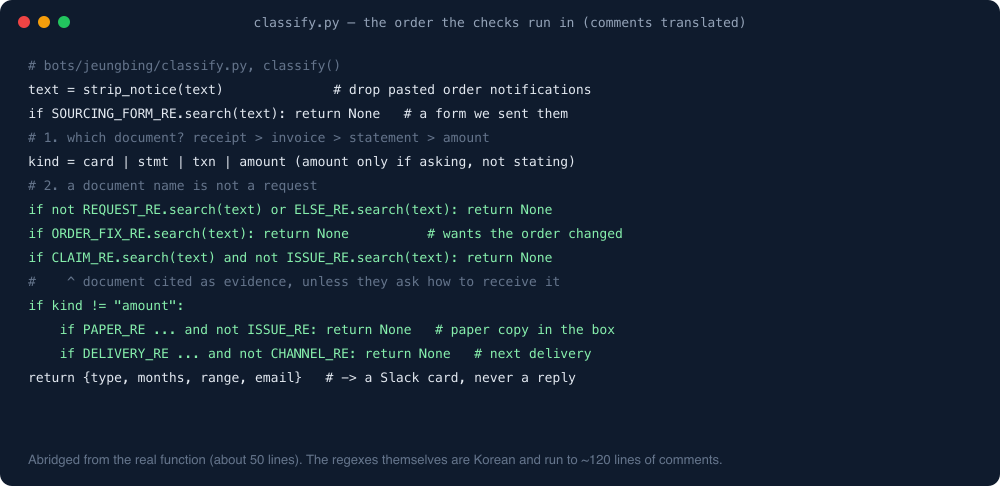
In plain English:
- Delete pasted notifications first. Customers paste our own automated order confirmations into the chat (“…was sent to the group chat by mistake, sorry”). The template contains the words “order history” and “request”. Twelve false statement hits came from that alone in one replay.
- Ignore forms we sent them. Our sourcing request form has a field called “expected purchase amount”. Customers fill it in. That is not a question.
- Amount questions must ask, not state. If a value follows the amount word directly (“purchase amount: 4–5 thousand”), it’s a statement. The word “minimum” in front of it (“minimum order amount”) means a pricing question.
- Every type needs a request verb. “Please”, “send”, “could I get”, “I’d like to know”, “how much”. A document name without one of those is somebody talking about a document. This one rule does most of the work.
- “Not X, but…” means they don’t want X.
- “Cancel / change my order” is about the basket, not the paperwork, even when it says “order history”.
- A complaint word plus a document is evidence, unless they also say how they want to receive it (“…by email”, “is there a way I can get it?”).
- Paper in the box and “with the next delivery” go to a person, because the bot can only email.
- Pricing and settlement policy (“what’s the monthly spend threshold?”, “how is the commission calculated?”) needs a human explanation, not a number.
Here are real customer sentences going through the production code today. The Korean originals are what got classified; I’ve translated, shortened and removed product names for the printout:
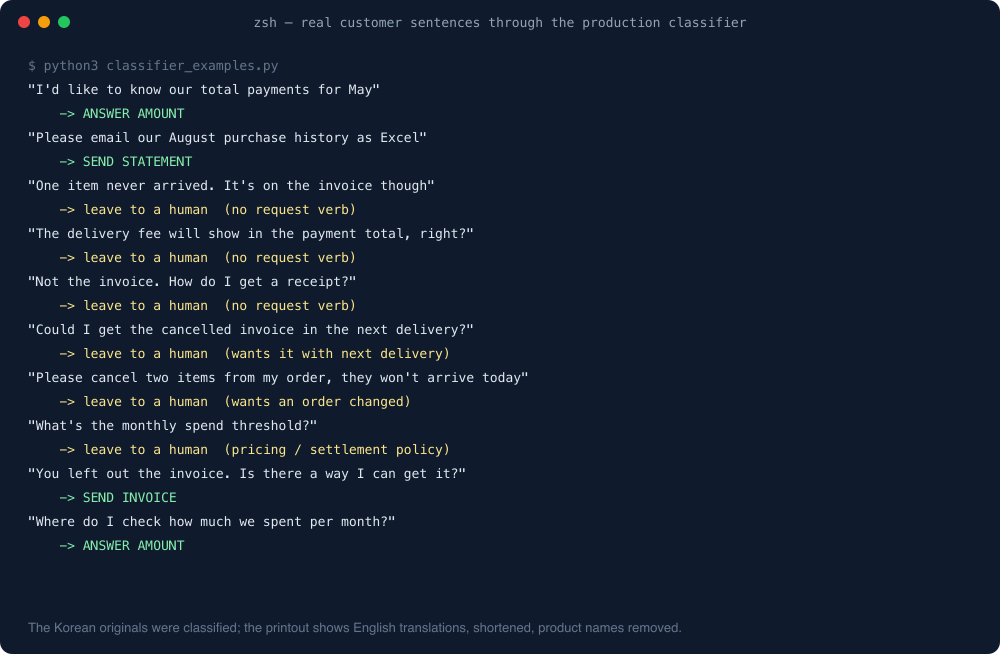
Two of those deserve a comment.
“You left out the invoice. Is there a way I can get it?” gets through, correctly, even though it’s a complaint. It names a way to receive the document, so rule 7 lets it pass. That exception went in together with the complaint rule, because this exact message was in the sample and a complaint rule without a way back in would have thrown it away.
“Not the invoice. How do I get a receipt?” gets left to a human, and arguably it shouldn’t. “How do I get” isn’t on the request-verb list, so this is a known miss. I could add it, but I’d want the replay to show me everything else it drags in first. The agent answers it in ten seconds, and I’d rather miss that one than post twenty cards for “how do I get the app to show my receipts?”.
After the rules went in, the same 7,216 messages gave 49 hits and none wrong. Nothing that had been a real request was lost.
What it cost
Every rule removes something real eventually. The request-verb rule means “September usage amount”, typed with no verb at all, is no longer caught. In the sample it had appeared zero times, so I accepted that. If it starts happening, the replay will show it.
The other cost is honesty about what “none wrong” means. I read every hit in the 7,216-message sample, and later every card that had actually been posted to Slack (26 of them on 21 September; the 6 wrong ones would all be dropped by today’s rules). At today’s size, I haven’t read all 954.
The same rules, on everything we have
The archive has grown a lot since September. Here’s the whole thing replayed through today’s rules, read-only, counts only. It takes about a second:
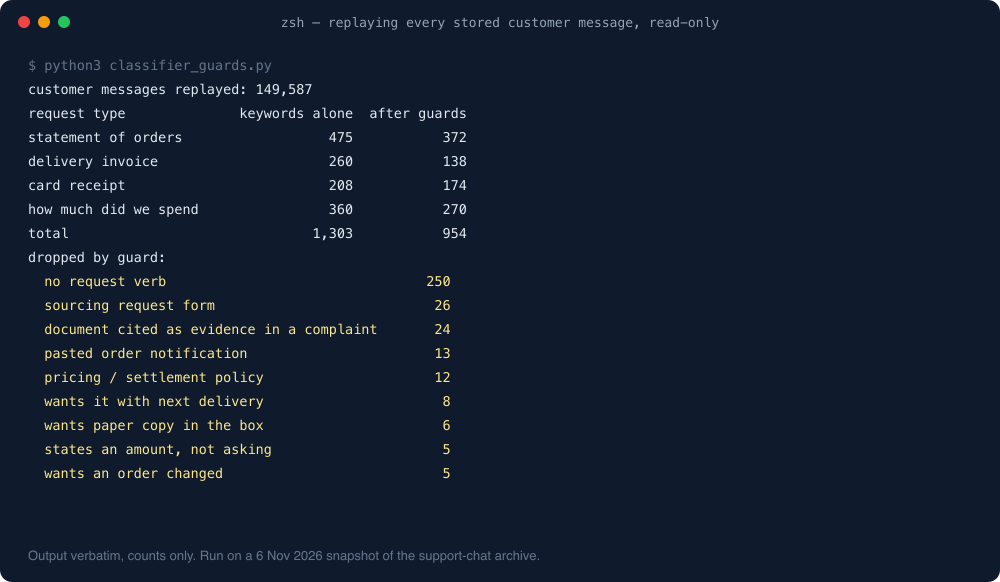
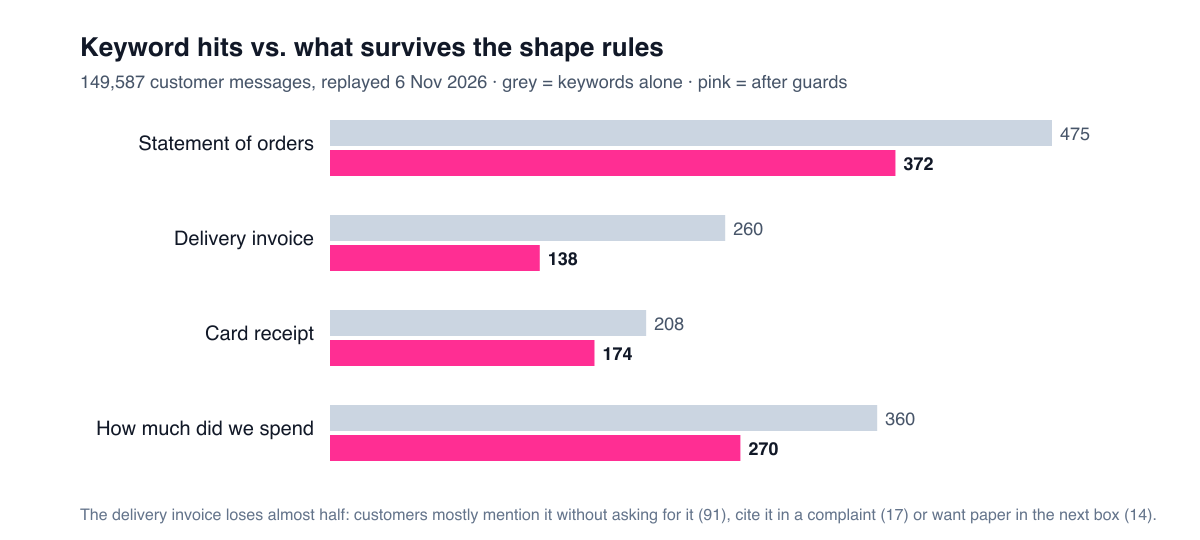
Of 1,303 messages that contain a document word or an amount word, 349 aren’t requests. A quarter, again, which suggests the September sample wasn’t unlucky; it’s just how people talk. The “needs a request verb” rule removes 250 of them on its own. The delivery invoice loses almost half its hits, because customers mostly mention it while talking about something else.
That replay is also the most useful tool in the project. Before any rule changes, I run the old and new classifier over the archive and print only the messages whose verdict changed. On 11 September a new complaint rule changed two verdicts in the whole archive, both correct. On 30 September adding one more word for “statement” changed 140, and every one of them was someone asking for the statement by a name I hadn’t known. You don’t need a labelled dataset to work this way. You need the archive and the patience to read the diff.
The “how much did we spend?” answer
The amount question was the last type added, on 9 September, after an agent looked up a customer’s May total by hand and typed it into the chat. It’s not a big job by volume: in the 45 days before that, about 7 a month, and 7 of the first 10 arrived in the five days around month-end (30 August to 3 September), which is when owners close their books. (That’s a floor: more than half our support contacts are phone calls, which this doesn’t see.)
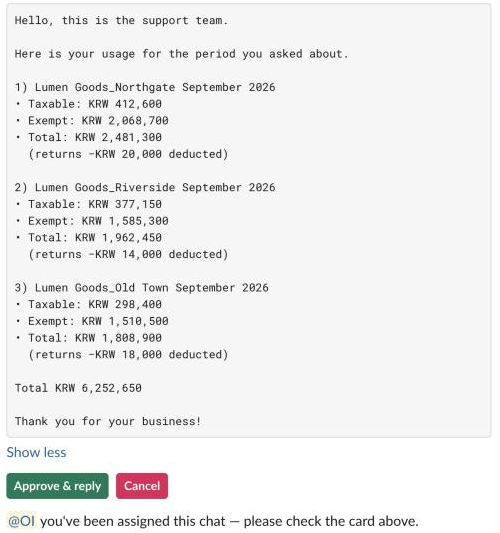
The answer is a number, so there’s no file. The approval card shows the lookup and, underneath it, the exact text the customer will get. If what you approve isn’t what’s sent, the approval is theatre.
Three details in there came from real chats:
- Taxable and exempt, per store. An owner with three stores sent us the format their accountant wanted. We copied it, and our August numbers matched theirs to the won.
- The delivery fee is in the total but not in the sentence. “Why is there a delivery fee on this?” is a support conversation nobody needs at month-end. The card shows it; the reply doesn’t single it out.
- “We have 3 stores” means 3 stores. The customer named one store, said “3 stores”, and the first version answered for one. Now the bot looks for other stores under the same brand and includes them only when the number it finds equals the number the customer said. If it finds four, it doesn’t guess which three: it shows the candidates on the card for the agent.
The number comes from the same function the statement bot uses, so the chat answer and the spreadsheet total for the same month can’t disagree.
The card also tags the agent who owns the chat. At detection time the chat often isn’t assigned yet (in one case the question arrived at 08:50 and an agent picked it up at 08:54), so the bot remembers the card and adds the tag in the thread on the first poll after someone is assigned.
What actually happened in Slack
Here’s every card the detector posted to the statement channel from 2 September to 5 November, read back from Slack:
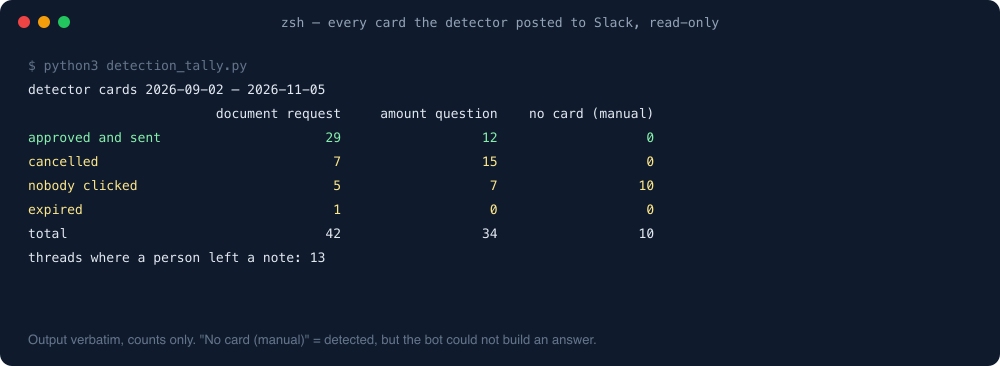
I expected the cancelled amount cards to be detector mistakes. Mostly they weren’t. The notes people left in the threads say things like:
- “Already answered. The robot was one step late.” The agent had typed the answer before the card arrived.
- “Sent separately.”
- “Lots of branches, I’ll handle it.”
A card that gets cancelled because a human was faster is the system working. The bot’s job is to make the slow path fast, not to race the agent on the fast one. The 10 “no card” rows are requests the detector caught but couldn’t build an answer for on its own (one note says simply “no orders in that month”). Those post a heads-up with no buttons, and the agent takes it from there.
What I’d tell you if you’re building one
- Read your false positives in a row before you write a single rule. They won’t be random. Ours came in five or six shapes, and each shape became one rule.
- Prefer rules about the sentence over lists of words. “Has a request verb” removed more noise than every keyword I ever deleted.
- Put a human click between the detector and the customer. Then the detector only has to be useful, not perfect, and you can ship it in a day.
- Keep a replay over your whole archive and diff the verdicts. One second per run, and it turns “I think this rule is safe” into “it changed two messages, here they are”.
- Write the exceptions as carefully as the rules. The complaint rule needed a way back in for “is there a way I can get it?”, or it would have thrown away the customers who most needed the document.
- Count the cancels, then read why. Half of ours meant “a person got there first”, which is not a bug.
One line from me
Customers use the same word to ask for a document and to complain about it. Teach the bot to read the sentence, not the word, and let a person press the last button.
How the bot picks evidence photos from the order is in photo matching for a support bot, and the rules for logging the complaints this detector ignores are in 20 rules an AI support logger needs.
More on this topic: the Support automation guide, with every post in reading order.