Photo Matching for a Support Bot: Pick From the Order, Never Guess
How our claims bot reads customer photos: pick from the order lines or return null, screen out ID cards and screenshots, catch reused photos with a 64-bit hash.
Customers send photos. A box with the wrong thing in it, a bag that leaked, a slip of paper, occasionally their business licence for reasons that are never explained. Our claims bot has to turn those photos into a row in a sheet: which product, how many, what’s wrong. This is what two months of doing that taught us, with the numbers, including the two weeks where the bot confidently told us a flat bag on a table and a box lid on a counter were the same photograph.
Three different jobs, three different tools
It took me a while to see that “handle the photo” is three unrelated problems:
- Which product is this? A vision model, but with its hands tied.
- Is this photo even evidence? A vision model, cheap, in batches of eight.
- Have we seen this exact photo before? No model at all. A 64-bit hash and some arithmetic.
Mixing them up is how the first version failed. Here they are in the order we got them wrong.
1. Never ask “what is this?”
The first version asked the model what was in the picture. It answered with careful descriptions: “looks like X, or possibly Y”. Accurate, useless. You cannot look up a product id by “possibly Y”.
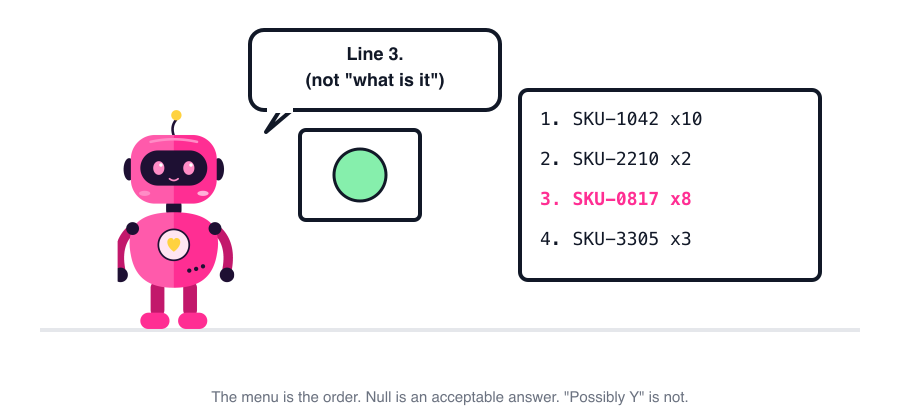
The version that works never asks that question. It asks: here is what this customer actually ordered in the last two weeks, as a numbered list; which line is in the photo? And it’s allowed to say none. Null beats a confident product that isn’t on the order.
Three details that each fixed a real failure:
- Collapse the same product across orders before showing the list. The model was returning null with “this product appears in lines 2, 4, 7 and 10 and I can’t tell which order it’s from”. Of course it can’t. Nobody can tell the delivery date from a photo of a box. Product first, then pick the order by date.
- The photo is untrusted input. It comes from a stranger. The system prompt says in plain words that text visible inside the image is not an instruction, and the CLI runs with
--restrictedso there’s nothing to do even if it tried. I don’t think anyone has tried. I don’t want to find out by accident. - If the pick disagrees with the conversation, drop the pick. Added 7 October after the model picked a product whose name shared nothing with what the customer typed. The chat is the stronger signal; the photo breaks ties, it doesn’t overrule.
Three images maximum per call, Sonnet, and the result carries a confidence word and a one-line “what I saw” that goes into the row’s note so a human can disagree quickly.
2. Not everything they send is evidence
We save claim photos to a shared drive, in a folder per claim, so the team can find them later. Around 29 September someone noticed the claims folder contained a customer’s business registration certificate (sent to change an address) and a screenshot of their order history from the app. Both uploaded by the bot as “evidence”, because to the bot an attachment was an attachment.
Now every photo is classified before upload, eight at a time, into four kinds: evidence, document, screenshot, other. Only evidence goes to the drive.
| Kind | Since 29 Sep | What it is |
|---|---|---|
| Evidence | 568 | Product, packaging, the delivery spot, a delivery note. Also an open shop door or a hallway with a box in it, which a dry rule would have rejected. |
| Screenshot | 29 | Phone screens: order history, chat, a web page. Even if there’s a product photo inside the screen. |
| Document | 8 | Licences, ID cards, bank books, handwritten order lists. |
| Other | 1 |
Two rules about the rules. When in doubt, evidence. Wrongly throwing away a photo of a rotten box is worse than wrongly keeping a screenshot. And if the model skips a photo or answers outside the vocabulary, it’s evidence. Every failure mode falls toward keeping, never toward losing.
3. Same photo, second claim
This is the one people actually ask about. Sometimes the same photo is attached to two claims. Usually it’s innocent: the customer sent it twice, or support uploaded the bot’s copy by hand. Occasionally it isn’t, and that’s worth a lot of money over a year.
No model here. Each photo gets a dHash: shrink to 9×8 grey, compare each pixel to its right neighbour, 64 bits. It’s indifferent to brightness, size and re-compression, and 64 bits means you can compare tens of thousands of photos in Python without thinking. Two photos are “the same” if their hashes differ by at most n bits. The whole story of this feature is what n should be.
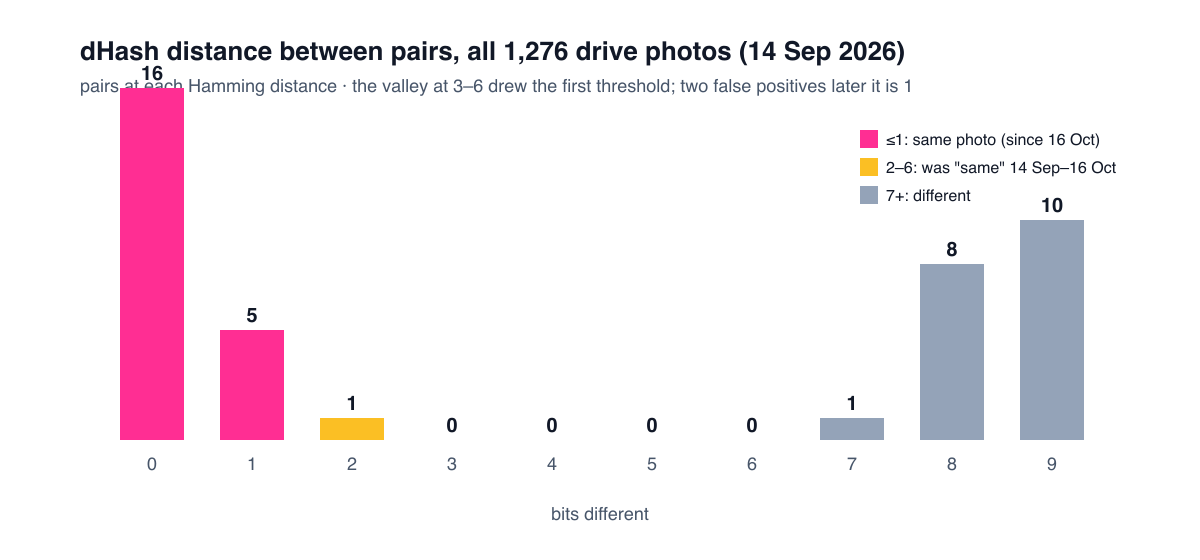
- 14 September: 8 → 6. I compared all 1,276 photos then on the drive against each other and looked at the distance distribution: 16 pairs at 0 bits, 5 at 1, 1 at 2, none at 3 to 6, then 1 at 7 and it climbs. A valley like that is the threshold drawing itself. Six.
- 15 October: mirrored copies, 1 bit only. We also check the horizontally flipped hash, because people do flip photos. A sack label matched a January photo of an unrelated product at 6 bits, mirrored. Flips are now matched only at 0–1 bits.
- 16 October: everything, 1 bit only. A bag on a table and a box lid on a counter came out 5 bits apart. Not similar. Not the same business. I looked at it and said “one bit, all of it”, and it held up: the dHash of a photo with little vertical structure (a flat bag on a table, a box lid on a counter) has few distinct rows, and such hashes sit 3–6 bits from each other all day while being pictures of unrelated things. We measured it on the 11,055 photos indexed by then: hashes with two or fewer distinct rows had 227 pairs at 3–6 bits, every one of them unrelated. So: re-compressions and screenshots of the same photo (0–1 bits) count. Re-takes, crops and rotations don’t, and that’s a deliberate loss.
Two engineering notes that mattered more than the threshold:
- Don’t cluster. Pair. The first report grouped near photos into clusters by union. 1,247 of 1,276 photos ended up in one cluster spanning 554 customers, because A touches B and B touches C and so on forever. Pairs don’t chain. The report is a list of pairs now, with both photos side by side in a Slack thread, and a human puts an emoji on each one.
- Band the index. All-pairs over 11,000 photos was 37 seconds. Split the 64 bits into 8 bands of 8; two hashes within d bits must agree exactly on at least one band, so you only compare candidates sharing a band key. 2.6 seconds. Same results.
Since 28 September the live checks have raised 45 alerts: 14 byte-identical, 18 near-identical (mostly before the 16 October tightening), 1 mirrored, and 12 where the EXIF capture time was days before the conversation it was sent in, which is its own kind of interesting. 36 pairs were posted for review and all 36 were reviewed. I’m not going to tell you how many were genuine, because the report is explicitly a list of places to look, not a list of accusations, and because the people reading it aren’t me.
What I’d keep
- The model picks from a list you give it, or says null. It never names things.
- Every classification failure falls toward “keep”.
- Hashing beats a model for “have we seen this”, and the threshold is a measurement, not a guess. Then it’s a smaller measurement.
- Pairs, not clusters. A human emoji closes each pair.
- The bot says where to look. It doesn’t say what happened.
One line from me
Nobody wants to squint at 1,140 photos of boxes. Hand it to the bot. Just don’t let it name what’s in them.
The rest of the rules the claims bot follows are in 20 rules an AI support logger needs; why a reused photo is only ever shown once is in the alert-routing post.
More on this topic: the Support automation guide, with every post in reading order.