Monthly Statement Emails From Slack: Dashboard → Spreadsheet → Gmail
A Slack command builds a customer's monthly statement from our dashboards and emails it after a human approves. The pipeline and the bug the button caught.
Before the bot, a monthly statement took a human fifteen minutes: open the dashboard, filter the customer and the month, export, fix the layout so it looks like the one the customer’s accountant expects, attach it, dig up the address, send. Dozens of customers. Every month. Fifteen minutes each, assuming nothing went wrong, which is a bold assumption on the first of the month.
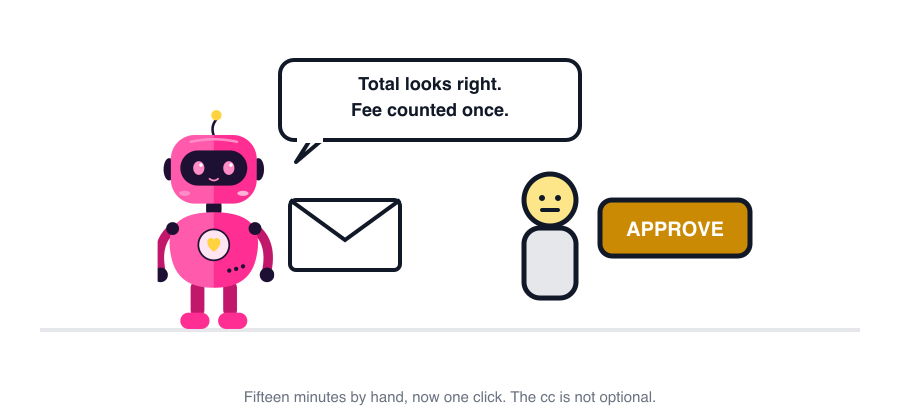
Now it takes a Slack command and one click. The fifteen minutes went somewhere nicer. The accountant on the other end has not noticed anything changed, which is the highest compliment a back-office bot can receive.
The pipeline
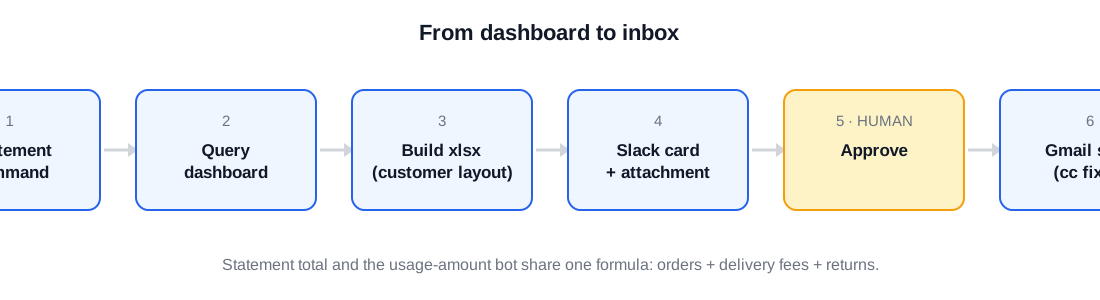
- Trigger. Someone types
/statement <company> <month>in Slack, or the support bot spots a customer asking for one in chat. - Fetch. The bot queries our internal dashboard (Grafana over the operations database) for that company’s orders and returns in the period.
- Build. A spreadsheet in the exact layout customers have received for years: header block, one row per order line, returns as negative rows, totals. Same column order, same labels, same everything. Customers’ accountants open this file. Change its shape and you will hear about it, warmly, from an accountant.
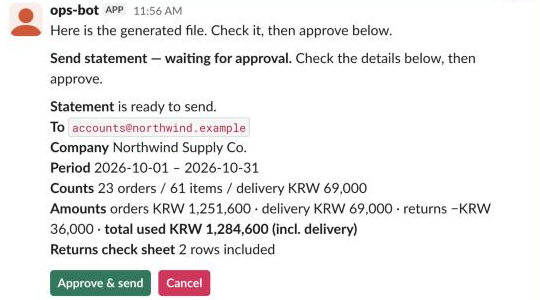
- Card. The file goes into the thread, and under it a card with the recipient, the company, the period, the counts (orders, items, delivery fees), the amounts (orders, delivery, returns, and the total actually used), and whether a returns-check sheet is included.
- Approve. Only the person who ran the command can click Approve. Only then:
- Send. SMTP, from the shared support address customers have always seen, with the support mailbox in cc. Always.
Here’s that card with exactly the production fields, re-created in a test Slack workspace with an invented company:
Three details that took longer than the pipeline
The same number, two ways. A customer can also ask “how much did we spend in May?” in chat and get a number from a different bot. That number and the statement total must match to the won, or we look like we’re making it up. Both bots call the same fetch and the same formula: orders + delivery fees + returns (negative). They diverged exactly once, because one path included a fee the other didn’t. Now there is one function and both call it, and they can’t disagree even if they wanted to.
The sender address. A mail account sends as itself by default. Customers expect statements from the shared support address they’ve always seen, not from whoever’s account the bot happens to use. That address is set up as a send-as alias on the sending account, and the bot sets it explicitly on every message instead of trusting the default.
The recipient check. Statements go to the customer’s own contact, which is usually a personal webmail address, not a company domain. The first version only allowed our own domain and was useless on day one. Now any address is fine except one that is one or two letters away from our own domain, which is almost always a typo of an internal address.
The bug the button caught
The dashboard repeats the delivery fee on every order line. The bot faithfully copied that, so a customer with ten lines in one order was charged ten delivery fees on their statement. The approver saw a total that was too big for a small customer and clicked Cancel. The bot now adds the fee once per order. The dashboard still repeats it, which is why the card shows the total and not the file. The total is where mistakes become visible.
Who approves
The person who asked for it, in Slack. Someone else clicking Approve gets a quiet “not yours” that only they can see. The cc to the support mailbox is not optional and isn’t on the card at all. A human choosing “no cc” at 6pm on a Friday is how a statement goes missing and nobody can prove it was sent.
Two months of it, counted
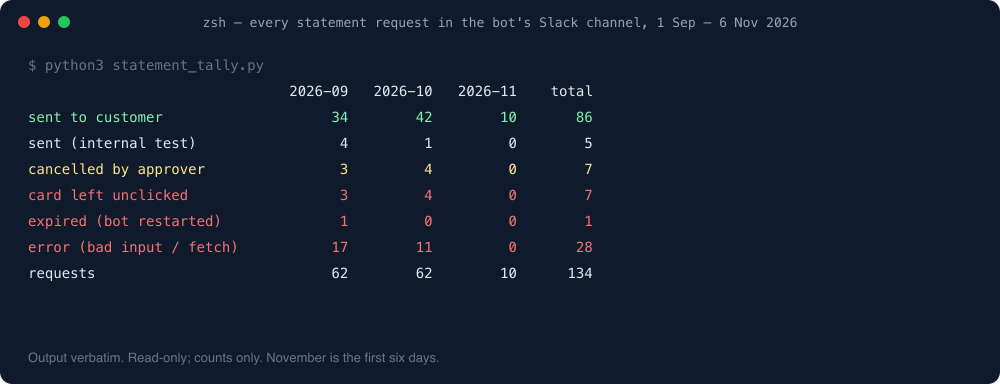
Every request is a thread in one Slack channel, so the channel is the log. I counted all of them, read-only, for this post:
What the numbers say, honestly:
- 86 statements went to customers in just over two months, plus 5 test sends to ourselves.
- 7 were cancelled by the person approving. One was the delivery-fee bug above; one was a customer whose file was going out in a separate email anyway. Each cancel is something that didn’t reach a customer by accident.
- 7 cards were never clicked. Those are requests someone started and then handled differently. The thread shows it, which is better than wondering.
- 28 ended in an error, and most of those are on the bot, not the person. The biggest group: it didn’t understand how the period was typed. People wrote “8월” (Korean for “August”, no year), “2026년8월”, “26년8월”, a two-month range, and once a year with an extra digit. On 4 September the bot learned the Korean year-month forms and month ranges, on 10 September company names with spaces in them; the rest were a data query failing or a company name that matched more than one customer. Every error message now says which forms it accepts. September had 17 errors, October 11, November so far none.
- 1 card expired because the bot restarted while it was waiting. Approval jobs live in memory, on purpose, so a restart kills pending buttons. We check for live buttons before restarting now.
What it replaced
Eighty-six statements in two months, each one a few minutes of someone’s afternoon that went somewhere nicer. But the bigger thing it replaced was the question “did we send theirs?”, which now has a Slack thread for an answer instead of a shrug.
One line from me
A statement became one command and one click, and the click is what caught the delivery-fee bug.
The same gate guards every other outbound action too: Slack approval buttons for AI bots. The referral-reward bot behind the same gate is in Slack’s 50-block limit.
More on this topic: the Slack bots & approvals guide, with every post in reading order.