Slack's 50-Block Limit: Paging 25 Approval Cards Into a Thread
A Slack message holds 50 Block Kit blocks. Our approval bot hit it at 25 cards. How we page the overflow into thread replies and keep clicks under a second.
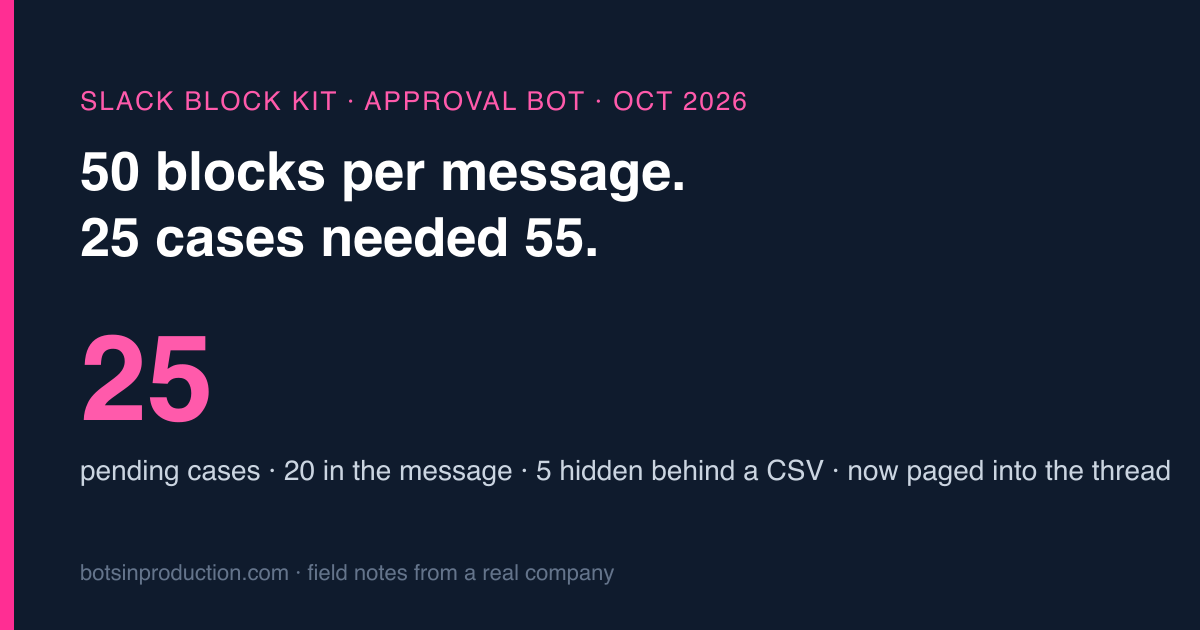
Slack allows 50 blocks in one message. Our referral-reward bot puts every case that needs a human decision into one message, two blocks per case, and in October it had 25 of them. This post is how that broke (quietly, which is the worst way), how we now page the overflow into thread replies, and the three details that made it work: a page order that never moves, redrawing only the page that was clicked, and noticing which message a click actually came from.
The bot, in one paragraph
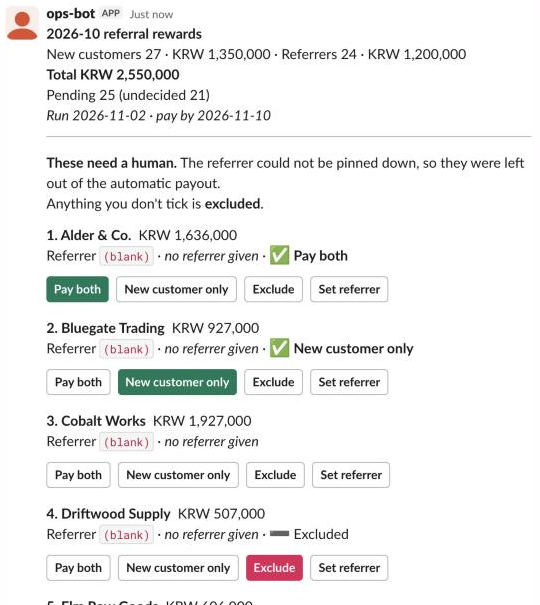
Customers who join through a referral earn a reward for themselves and the customer who referred them. Once a month the bot works out who qualifies. Most cases are clear and go straight through. The rest, where the referrer’s name was left blank, or only half matches a real customer, or matches two, go into a Slack message for a human: one card per case with four buttons, Pay both, Only the new customer, Exclude, and Set referrer. At the bottom, one button builds the final list. The general pattern is in the approval buttons post; this is what happens when the list gets long.
The block maths
Each case is two blocks: a section with the text and an actions row with the four buttons. Around them sit a summary, a divider, an instruction line, and the final button.
| Blocks | |
|---|---|
| Summary + divider + instruction | 3 |
| 20 cases × 2 | 40 |
| “More below” note + final button | 2 |
| Total at 20 cases | 45 |
| Total at 25 cases | 55, rejected |
Slack doesn’t truncate a message that’s too big. It refuses the whole thing. I checked again for this post, against a test workspace, with a short script that posts 50 blocks and then 55:
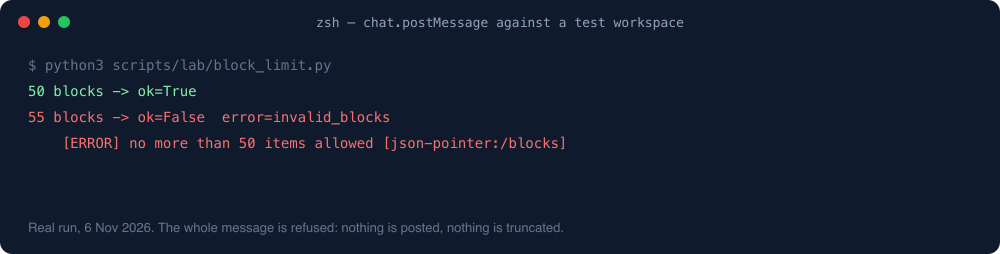
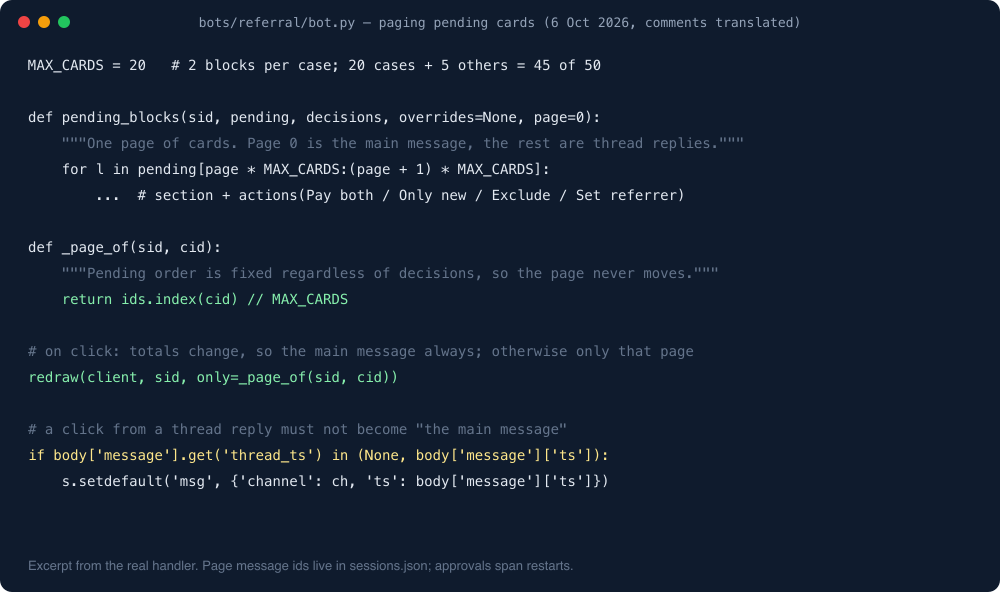
chat.update behaves the same way: the update fails with invalid_blocks and the old message stays as it was. So from the start the code capped the list at 20 cases, MAX_CARDS = 20, with a comment saying why, and that was a sensible guard.
The bad part was what happened to case 21 onwards.
How it failed: quietly, and towards “no”
In September there were 16 pending cases and everything fit. In October the bot found 52 reward lines: 27 cleared automatically and 25 needed a human. Fifteen had no referrer written down, six only partly matched a customer name, two were vague, one matched two customers, one matched nobody.
The message showed the first 20 and a grey line: “5 more, see the CSV.”
Nobody opens the CSV. That’s not a criticism of anybody; it’s what a grey line at the bottom of a long message is for. And the instruction at the top of the same message said, correctly, that any case you don’t tick is excluded. Put those together and the design was: five customers silently don’t get their reward unless someone reads the small print and opens a file. A guard against one error (Slack rejecting the message) had produced a worse one (people not getting paid), and it produced it without a single error in the log.
We caught it while the October session was still open. The fix went in on 6 October, the bot redrew the open session on restart, and the five missing cases appeared in the thread. The 26 clicks in the table further down are those 25 decisions being made.
The fix: page into the thread
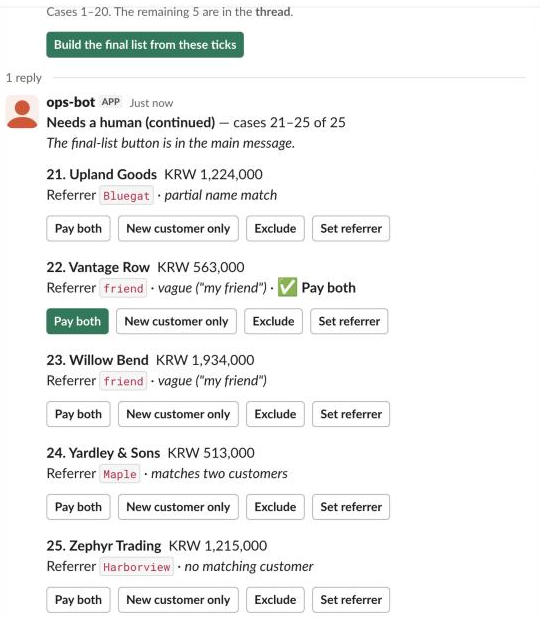
The main message keeps the first 20 cases, the totals, and the one final button. Cases 21 to 40 go into a thread reply under it, 41 to 60 into the next, and so on. Every page starts with a header saying which cases it holds, out of how many, and that the final button is in the main message. The note in the main message stops being a shrug and becomes a pointer: “Cases 1–20. The remaining 5 are in the thread.”
Here it is in a real Slack client. The workspace is a test one and the companies and amounts are invented, but the blocks come from the same code as production, the reasons match October’s mix (fifteen with no referrer, six partial matches, two vague, one with two candidates, one with none), and the main message is exactly 45 blocks:
Three details did most of the work.
1. The order never moves. The list of pending cases is built in a fixed order that doesn’t depend on decisions. Ticking case 23 doesn’t push it off the list or shuffle case 24 onto page one. So “which page is case X on” is just its index divided by 20, and a click can find its page without searching. If the order depended on state, every click could reshuffle every page, and you’d be redrawing the lot.
2. Redraw what changed, not everything. Every click changes the totals, so the main message is always updated. Apart from that, only the page holding the clicked case is redrawn. The page message ids are stored in the session file next to the decisions, because approvals can sit for days and the bot restarts in between. If the number of pending cases grows (someone fixed a referrer and a case reappeared), missing pages are posted. If it shrinks, a page that’s now empty says so instead of vanishing.
3. Know which message was clicked. This is the one that would have bitten. The old code remembered “the message to update” as whichever message the first click came from. With one message, fine. With pages, if the first click of the day happened in the thread, the bot would have adopted a thread reply as its main message and drawn the totals into the thread. Now it only adopts a message as the main one when the click came from a top-level message, which is to say when thread_ts is either absent or equal to the message’s own ts.
Did it make clicks slower?
A bit. The bot logs the time of every step of every click.
| Clicks | Time per click | |
|---|---|---|
| September, one message | 4 | 0.47–0.50 s |
| October, main message + one thread page | 26 | median 0.6 s, slowest 2.2 s |
All of it is Slack’s API, two chat.update calls instead of one. The bot’s own work (saving the decision, recomputing totals) logs as 0.00 s, because back in September we stopped re-reading the database on every click. That earlier version took 6.6 seconds per click, which is long enough for a person to click again, which is how you get two decisions for one case. The source data is read once per session, cached on disk so a restart doesn’t lose it, and only re-read when the final list is built.
Things we considered and didn’t do
- A modal. Modals allow 100 blocks, and they’re private to the person who opened them. The whole point of putting approvals in a channel is that everyone sees the same state and anyone can pick up where someone else stopped.
- “Next page” buttons. Works, but now the message has a hidden state (which page is showing) that two people can fight over.
- Raising the cap by making cards smaller. One block per case is possible if you drop the buttons into an overflow menu. Three clicks per decision instead of one, and it only moves the wall to 45 cases.
What I’d tell anyone with an approval bot
- Count your blocks per item and decide the cap on purpose. Then decide what happens to item cap+1 before it exists.
- Never let overflow fall into the default decision. If unticked means “no”, hidden means “no” too.
- Keep the list order independent of decisions, so pages are stable.
- Store page message ids with the session; approvals outlive restarts.
- Check
thread_tsbefore treating a clicked message as the main one.
One line from me
Item 21 is where approval bots quietly break. Decide what happens to it before a busy month decides for you.
Why every action waits for a click in the first place is in Slack approval buttons for AI bots; why these cards go to a channel and not a DM is in the alert-routing rules.
More on this topic: the Slack bots & approvals guide, with every post in reading order.