Volatile Formulas Killed Our Google Sheet: The Audit Found 20,000
Our claims sheet had 20,320 volatile formulas and sat at 85.5% of the cell limit. How we counted them, what replaced them, and a re-run of the audit today.
A Google Sheet that freezes when you type a letter is almost never “too much data”. Ours wasn’t. It was twenty thousand formulas recalculating every time anyone touched anything, like a room full of accountants who all redo their sums whenever someone coughs. This post is the audit that found them, what replaced each kind, a second slowness nobody warns you about, and the same audit run again today against both files.


What “volatile” means
Most formulas recalculate only when something they reference changes. A small, sinister family recalculates on every change anywhere in the file: TODAY(), NOW(), RAND(), RANDBETWEEN(), INDIRECT(), OFFSET(). One is harmless. Ten thousand, in a file that also pulls data from other files, is a sheet that can’t keep up with a keystroke.
What we actually had
The audit on 14 September found 20,320 volatile formulas in the claims tab, in two columns, both put there years ago for good reasons:
- 10,197 ×
INDIRECT()in a helper column. Picking a cause in one column should limit the detail dropdown in the next, and the classic trick is a helper that builds the list’s range name from text withINDIRECT. One per row, filled past the last row of data. - 8,951 ×
NOW()referring to its own cell. The “date received” column used the old trick for a timestamp that doesn’t change, a formula that returnsNOW()the first time and its own previous value after that (the usual shape is=IF(B2="", "", IF(C2="", NOW(), C2))inside C2). It only works with iterative calculation switched on in the file settings, which ours was.
That wasn’t the whole bill. The same file held a hidden analysis tab, three times the size of the claims tab, with 113,237 formulas and about 1.6 million IMPORTRANGE lookups. Nobody had opened it in months. It recalculated anyway. Overall the file was at 85.5% of Google’s 10-million-cell limit, mostly because one tab imported the entire order history and grew by roughly 17,000 cells a day.
How to count them
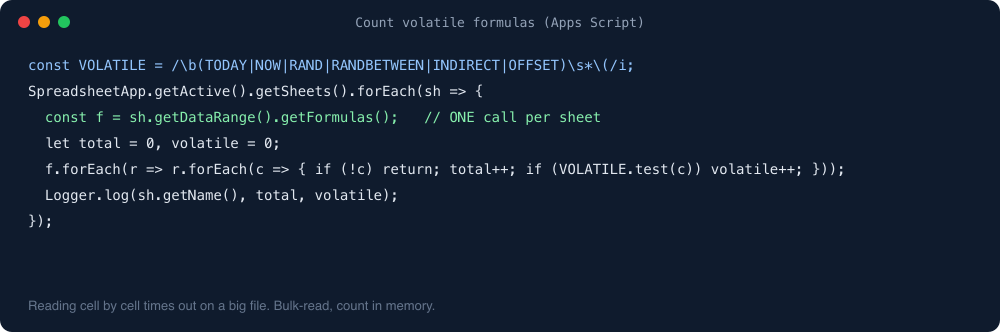
You can’t see volatility in the UI; a volatile formula looks exactly like a well-behaved one. The first count was a short Apps Script that walks every tab, reads formulas in bulk, and tallies by function name:
function auditFormulas() {
  const VOLATILE = /\b(TODAY|NOW|RAND|RANDBETWEEN|INDIRECT|OFFSET)\s*\(/i;
  const out = {};
  SpreadsheetApp.getActive().getSheets().forEach(sh => {
    const f = sh.getDataRange().getFormulas();      // one call per sheet, not per cell
    let total = 0, volatile = 0;
    f.forEach(row => row.forEach(cell => {
      if (!cell) return;
      total++;
      if (VOLATILE.test(cell)) volatile++;
    }));
    out[sh.getName()] = { total, volatile };
  });
  Logger.log(JSON.stringify(out, null, 2));
}
The detail that matters is getDataRange().getFormulas(): one call per sheet. Reading cell by cell times out on a big file, and you’ll have learned nothing except patience.
What didn’t help
First we looked at archiving an old, inactive group of customers’ rows. The numbers said it would free 0.7% of the cell limit. Rows weren’t the problem. Formulas, imports and a hidden tab were. This is the step everyone does first and it’s the step that does nothing.
What replaced each one
We didn’t edit the live file. We built a new one next to it and moved the data in, so the old one kept working while we did.
The dependent dropdown: INDIRECT → FILTER → no formula at all. FILTER over a small lookup table gives the same list and isn’t volatile. That was step one. Step two came later the same day (see the next section): the helper column went entirely, and a tiny onEdit script now sets the detail dropdown on the one row whose cause just changed.
The self-referencing NOW(): replaced by onEdit. When someone fills in the customer cell, the script writes the current time into “date received” once, as a plain value, and never touches it again. Iterative calculation is off.
Per-row lookups: five ARRAYFORMULAs. Customer grade, region, warehouse and so on come from one ARRAYFORMULA per column over a values tab inside the same file. No IMPORTRANGE in the claims tab at all.
The hidden analysis tab: deleted. Its job went to a separate analysis page outside the sheet.
On the day of the switch: cells 8.55 million → about 1.04 million, formulas 167,366 → 7, volatile 20,320 → 2 (two TODAY()s on a small dashboard tab, on purpose).
The second slowness: drawing, not calculating
The new file still froze for the person who tested it. Recalculation was fixed; the browser was struggling to draw the sheet. Three things were expensive to render even though none of them were volatile:
- The
FILTERhelper spilled 15 cells per row, about 165,000 cells the browser had to lay out. - 10,999 separate data-validation rules, one per row, each pointing at its own row’s helper range.
- Conditional formatting over whole columns, like
=AH:AH="price deduction"applied to every row, instead of a row-relative=$AH2="price deduction".
Moving the dependent dropdown into onEdit removed the first two; rewriting the formatting rules row-relative fixed the third. The claims tab went from 11,006 formulas to 7, and the tester’s verdict was “much faster”. If a sheet is still slow after you’ve removed the volatile formulas, look at what the browser has to paint.
The same audit, today
For this post I ran the count again, read-only, through the Sheets API, against both files:
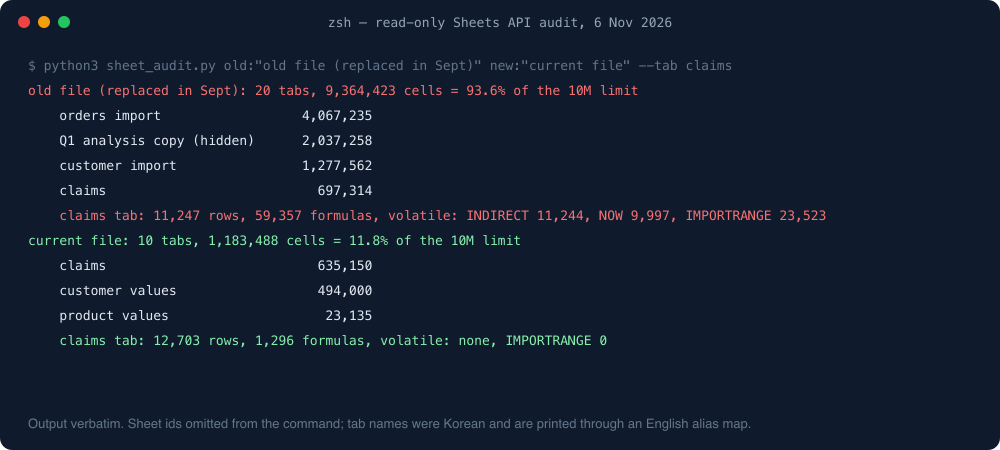
Two things in there I didn’t expect. The old file, which nobody writes claims into any more, has kept growing because its order import still runs: 93.6% of the limit, with more volatile formulas than in September (its rows kept arriving until the switch). If we’d tried to fix it in place, we’d be out of room about now.
And the current file has 1,296 formulas, not 7. Six are the column ARRAYFORMULAs (the seventh, company name, became a plain input column so the bot could write it). The other 1,290 are HYPERLINK cells the bot writes so each row links back to its support chat. They’re plain, non-volatile formulas, so I’m leaving them, but it’s a reminder that “7” was a snapshot, not a state. An audit you run once is a photograph.
The rule we wrote down
A formula lives in a header row as an ARRAYFORMULA, or not at all. No volatile functions outside the dashboard tab. No IMPORTRANGE in a tab people type into. It’s on the sheet’s “how this works” tab, and the bot that writes rows only writes plain values into input columns.
The sheet is still our database. The limits were never Sheets’ fault. They were ours, lovingly accumulated over four years.
One line from me
Twenty thousand volatile formulas came down to two, both on purpose. Then run the audit again, because the number doesn’t stay where you left it.
What else the audit found, and the layout that followed, is in Google Sheets as a bot database.
More on this topic: the Google Sheets as a database guide, with every post in reading order.