onEdit Triggers That Keep Two Columns in Sync (and the Undo Bug)
Two column pairs in our claims sheet must always match. onEdit fills them, Undo breaks them, a one-minute sweep repairs them. With the real numbers.
Our claims sheet has two pairs of columns that must always agree: a customer’s id and their company name, and a product’s id and the product’s name. A person types one side; the other has to follow along like a well-trained dog. Simple. Until a bot started writing rows and someone discovered Ctrl+Z. This is how the sync works now, the order we learned it in, and a check of the live sheet run today.
Why not a formula
The obvious version is a lookup formula: type the id, a VLOOKUP shows the name. Our derived columns are formulas, one ARRAYFORMULA per column in the header row. The pairs can’t be, for two reasons.
First, either side can be the one a person knows. An agent on the phone hears a company name; an agent reading an order sees an id. Whichever they type, the other has to appear, and a formula only works in one direction.
Second, the bot writes these columns too, and a value written into the spill range of an ARRAYFORMULA doesn’t just sit there. It breaks the formula. We learned that in September when a script wrote a value into four lookup columns and 9,528 rows of derived data vanished at once, because each column’s single formula had been replaced by one cell’s value. Those columns now carry a warn-on-edit protection, and the pairs are plain values kept in sync by a script.
onEdit, and the two things it doesn’t see
An Apps Script onEdit trigger watches both sides of both pairs. Simplified:
function onEdit(e) {
  const sh = e.range.getSheet();
  if (sh.getName() !== 'Claims') return;
  const c = e.range.getColumn();
  if (c === CUSTOMER_ID || c === COMPANY) fillCustomer(e.range, sh);   // either side → the other
  if (c === PRODUCT_ID || c === PRODUCT_NAME || c === ORDER) {
    fillProduct(e.range, sh);   // what it can from a lookup tab, right now
    queue(e.range);             // the rest: the bot reads the queue every 5 s
  }
}
The customer pair is filled straight from a values tab inside the sheet. Company names aren’t unique (about 9% of our claims name a company that shares its name with another), so when a name matches more than one customer the script fills nothing and leaves the candidates in a cell note with a yellow background. A wrong guess here looks fine and is wrong, which is the worst kind of cell.
The product pair needs more than the sheet has: the order’s delivery date, the category, sometimes the order itself. So onEdit fills what it can and writes the row number to a small queue tab. The bot reads that tab and fills the rest from the operations database. It used to read every 15 seconds; on the first day we measured ten seconds between typing an id and seeing the name, which felt broken, so it’s every 5 now. A company that’s brand new gets a second pass five minutes later, after the customer table has caught up.
Two things onEdit never sees, both learned the usual way:
- The bot’s own writes. Triggers fire for edits in the UI, not for writes through the API. The bot fills both columns of a pair itself.
- Undo. Which is the rest of this post.
The Undo bug
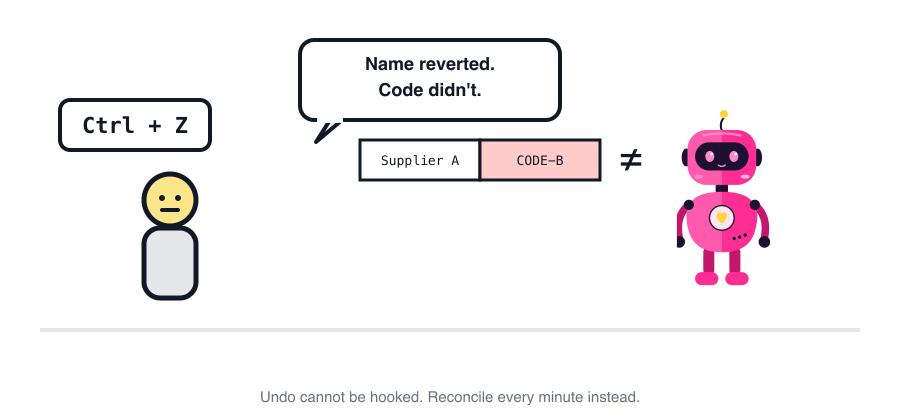
Someone typed a product id. The trigger filled in the name and category. Then they pressed Undo, as one does. Undo reverted their edit (the id) but not the script’s edits (the name and category). The row now had one product’s id and another product’s name, and nothing looked wrong. We found it on 12 October in a row where the name and the id belonged to two completely different products.
You can’t hook Undo. There is no onUndo. I checked, twice, with hope in my heart. So instead of preventing it, we detect and repair.
A one-minute sweep, with one column in charge
The id is the master. For products, the id column wins and the name column is corrected to match. The id is what the order, the supplier and the settlement all join on; the name is for people to read. Deciding the master in advance is the entire trick. Without it, “they disagree” has no answer, just two columns glaring at each other.
The sweep runs in the bot, not in Apps Script, once a minute. It reads the id and name of the last 300 rows in one call, looks the ids up in the product table, and compares each name with a fuzzy match, because people type names loosely and that’s fine. Only a name that doesn’t resemble the id’s product at all gets overwritten. Since 23 October it also fills names that are simply empty, which catches rows the queue missed.
Before switching it on, I ran it dry over rows 9,174 to 11,174: 2,001 rows, 2 mismatches, both Undo. So this is a rare bug. It’s also one that goes into a monthly settlement unnoticed, which is why a cheap check every minute is worth it.
In the bot’s logs from 3 to 6 November, the sweep wrote 5 times. All five were empty names being filled. No Undo repairs at all that week. The queue, meanwhile, filled 50 rows in 40 runs for people who typed one side of a pair.
The live sheet, today
For this post I ran the same comparison over the last 2,000 rows with writing switched off:
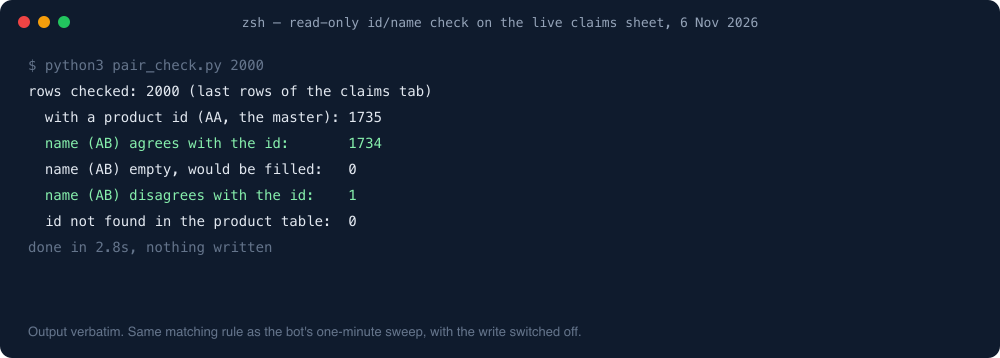
1,734 of 1,735 agree. The one that doesn’t is about 1,100 rows back, outside the sweep’s window, and it isn’t an Undo: the operations system renamed that product after the row was written. Old rows keep the name they were logged with, on purpose, so a claim from August still reads the way the customer described it.
What we’d tell you
- Pairs that either side can start from need a script, not a formula. Derived columns that only go one way can stay formulas.
- Never write a value into an
ARRAYFORMULA’s spill range. Protect those columns with a warning. - Human edits fire triggers; API writes don’t. Your bot must write every derived column itself.
- You can’t prevent Undo. Pick a master column, sweep on a timer, and only overwrite what clearly disagrees.
- Measure before you fix. Two bad rows in two thousand is a reason for a cheap sweep, not a rewrite.
One line from me
Undo is the one user the trigger never planned for. A one-minute sweep that trusts the id column cleans up after everybody, and most weeks finds nothing to do.
The layout these columns live in is in Google Sheets as a bot database.
More on this topic: the Google Sheets as a database guide, with every post in reading order.