What 17 Claude Code Bots Cost Per Month: US$20 (Real Numbers)
Every “I automated my business with AI” post I read has the same hole in it: no bill. So here is mine.
I lead operations at a B2B food-distribution company in Korea. I am not a developer. Since 2025 I have built 17 bots with Claude Code that do real work every day: logging customer claims from chat transcripts, sending monthly statements, watching our Slack for errors, pricing products from market data, and more. They run on one Mac mini in the office.
Here is what that costs, where the money actually goes, and the two costs that are not on any invoice.
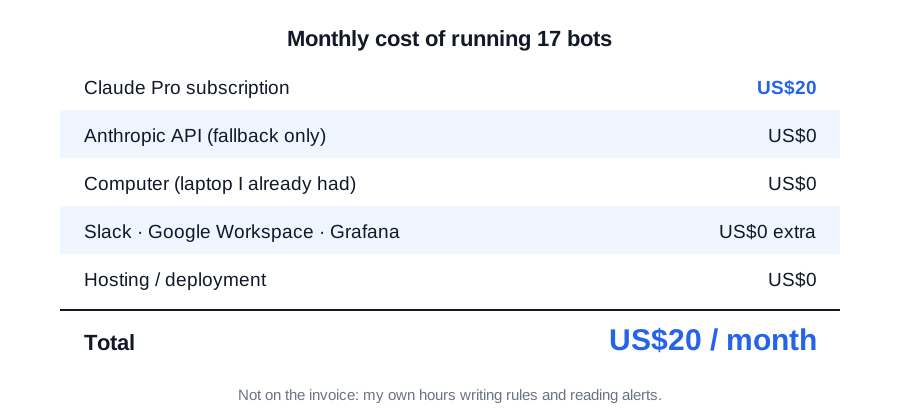
The short version
| Item | Monthly cost |
|---|---|
| Claude Pro subscription (the bots run on it) | US$20 |
| Anthropic API (fallback for chat summaries only) | US$0 |
| A computer to run them on | US$0 (the laptop I already had) |
| Slack, Google Workspace, Grafana | US$0 extra (already paid for by the company) |
| Domain, hosting for the bots | US$0 (they run locally, nothing is deployed anywhere) |
Twenty dollars a month. That’s the whole bill. If you expected a four-figure number, keep reading, because the reason it’s small is the part worth copying.
Why the API bill is nearly zero: the bots call claude -p
Most tutorials wire bots to the Anthropic API with an API key and pay per token. I did that for exactly one piece: summarising closed support chats, because that runs three at a time and needs to be fast.
Everything else shells out to the Claude Code CLI:
claude -p --model <model> --restricted \
  --no-session-persistence --strict-mcp-config \
  --output-format json --system-prompt "<system>"
That one command is the engine behind the claims logger, the error watcher, the statement sender, the price bot. Each bot writes a prompt to stdin, gets JSON back on stdout, and parses it. There is no SDK, no token accounting, no key rotation. It runs on the same subscription I use to build the bots in the first place.
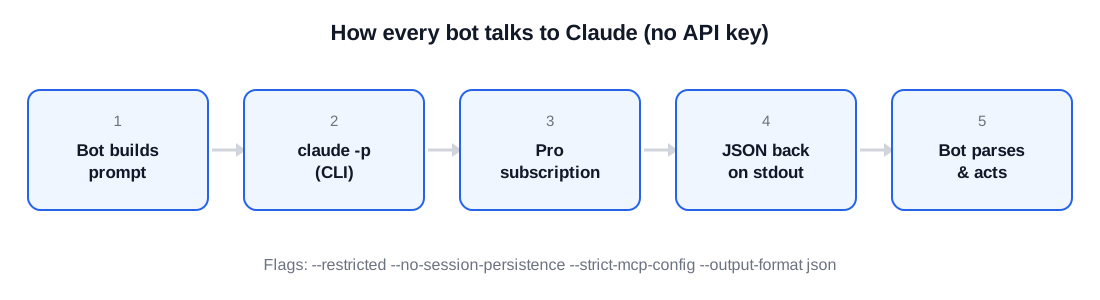
The flags matter:
--restrictedand--strict-mcp-configstop the bot from touching tools I didn’t give it. A bot that summarises chats has no business reading my filesystem.--no-session-persistencemeans every call starts clean. Bots must not remember the previous customer.--output-format jsongives me a parseable envelope with anis_errorfield, so a failure is a failure and not a half-written sentence.
The trade-off: a Pro plan has usage limits, and if the CLI isn’t logged in on the machine, every bot fails at once. That happened. It’s in the failure section below. I have not hit the usage limit with 17 bots, because each bot call is small: one prompt in, one short JSON out, a few hundred times a day. Bots don’t have long conversations.
Where the API key still earns its keep
The chat summariser has an API fallback:
body = {
    'model': os.environ.get('CRM_API_MODEL', 'claude-sonnet-5'),
    'max_tokens': 1200,
    'system': SYSTEM,
    'messages': [{'role': 'user', 'content': prompt}],
}
If ANTHROPIC_API_KEY is set, summaries go through the API; otherwise they go through the CLI. The key is not set. The fallback exists so that if the subscription ever becomes the bottleneck, I can flip one environment variable instead of rewriting anything. So far the API line on my bill is zero. max_tokens is capped at 1,200 because a claim summary that needs more than that is wrong. I also cap the number of items the model may return at eight. When it returns more, it has started copying the customer’s order list instead of summarising the complaint, and I throw the result away.
I run summaries three at a time and write the resulting spreadsheet rows one at a time. That ordering is not a style choice. Running the writes in parallel gave me more than 300 database is locked errors in one evening and seven chats the bot simply gave up on. That night gets its own post.
The hidden cost: my time, measured honestly
I spend roughly [[CONFIRM: hours per week]] hours a week on the bots now. In the first two months it was closer to [[CONFIRM]]. That time went to:
- Writing and rewriting the rules. The claims logger alone has more than 40 rules that no tutorial mentions, such as “an exchange that fails again is a new row, not an update” or “if the customer says ‘not everything arrived’, that’s a missing-item claim, not a quality claim”. Each one came from a real mistake.
- Reading the bot’s Slack alerts. Every error goes to my DM, not a channel. That was deliberate, and it means I am the person who sees all of them.
- Benchmarking. When I changed the summariser’s model, I re-ran it over past chats and compared rows. Accuracy went up when I added the company’s recent claim history and the order items as context. That bench run is the reason I trust the numbers in the sheet.
If you value that time at anything, it’s the biggest line on the bill. I think it’s worth it, but I won’t pretend it’s zero.
You don’t need a server. You need a laptop that doesn’t sleep.
The bots run on an ordinary MacBook with launchd keeping one Python process alive. There is no cloud instance, no Docker, no deployment. If you already own a laptop, your hardware cost is zero.
The only real requirement is that the machine stays awake. “The bot didn’t log anything last night” turned out, more than once, to mean “the laptop went to sleep”. The first thing I check now when a bot goes quiet is the Mac’s power log, not the bot. Plug it in, turn off sleep on power, and you’re done.
One trap when you move from “running it in a terminal” to “running it as a service”: launchd does not load your shell’s PATH, so a bot that worked perfectly from the terminal fails silently as a service because it can’t find the Claude CLI. The fix is a full path in the config and never calling the bare name claude from code.
What I’d tell myself a year ago
- Start on the subscription, not the API. You will iterate on prompts dozens of times before anything is stable. Paying per token during that phase is paying to learn. Pro at US$20 has been enough for 17 bots.
- Cap output tokens per task. The cap is a correctness tool, not a cost tool. A summary that needs 3,000 tokens is a summary that went wrong.
- Don’t buy a server. A laptop that’s plugged in and not allowed to sleep removed more failures than any prompt change, and cost nothing.
- Count your hours. The US$20 is small precisely because a human is doing the parts that are hard to automate: writing the rules and reading the alerts.
Next in this series: the Slack approval button that sits in front of every bot action, and why nothing ships without a human click.