Input Columns vs Formula Columns: A Sheet Layout Bots Can't Break
The one layout rule that made our Google Sheet safe for a bot: 15 input columns, everything else derived. Three source-of-truth numbers, renamed products.
If a bot is going to write to your spreadsheet, the spreadsheet needs a rule about which cells it’s allowed to touch. Ours didn’t have one for years, which is how you end up with five columns called “amount” and a meeting about which one is real.
This is the rule we landed on, and the three decisions hiding inside it.
The rule
Fifteen columns are input. Every other column is derived from them. Input columns hold plain values and are the only cells a bot or a human may write. Derived columns hold formulas and nobody types in them, on pain of a very polite Slack message.
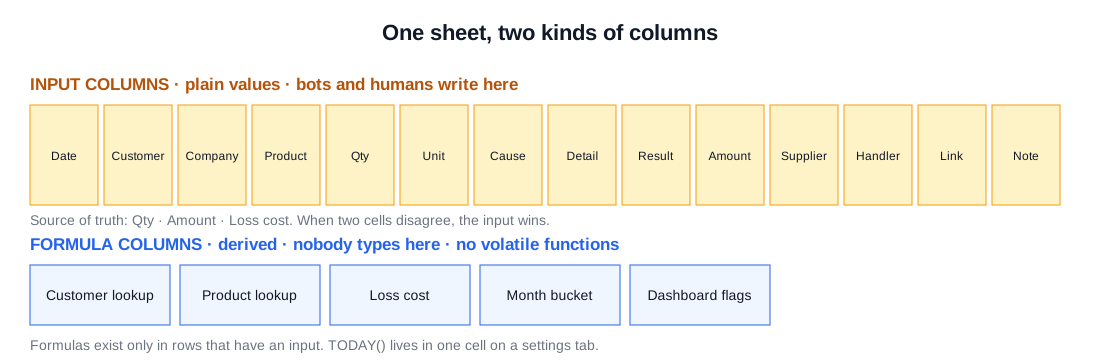
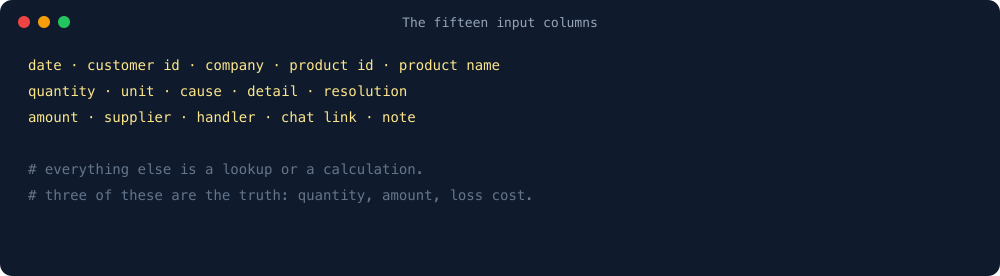
The fifteen: date, customer id, company, product id, product name, quantity, unit, cause category, detail, resolution, amount, supplier, handler, chat link, note. Everything else, from the customer’s branch to the loss cost to the month bucket, is a lookup or a calculation that someone can trace back to those fifteen.
Decision 1: three numbers are the truth
For any claim, three cells are the source of truth: quantity, amount and loss cost. Every other number is derived from them. When a report disagrees with the sheet, or two columns disagree with each other, the question is always “what do those three say?” and the argument ends.
This sounds obvious. It wasn’t, because the sheet had collected five different “amount” columns over the years and nobody could say which one the settlement actually used. Naming the three ended that in an afternoon.
Decision 2: the name follows the system, the id stays
Products get renamed in our operations system, because someone in merchandising had an idea. The sheet stores the product id as input. The product name column displays whatever the system calls that id today. Old rows keep their id; their displayed name updates. A claim from March about “Tofu 300g” now shows the product’s current name, and it’s the same tofu.
The alternative, storing the name as typed, meant the same product appeared under four spellings in every report. We tried it. Don’t.
Decision 3: dropdowns are the schema
Two input columns use dependent dropdowns: the cause category, and a detail list that depends on it. When the bot started writing rows, it wrote values that looked right and weren’t on the list (“Wrong item delivered” instead of “Wrong item”). Data validation flagged thousands of cells and the dropdown broke for everyone, including the people who’d done nothing wrong.
The fix was not to loosen validation. The bot now learns the allowed values from the existing rows, writes only those, and leaves the cell empty for a human when it can’t match. The dropdown list is the schema. The bot conforms to it or abstains. There’s no third option, and the bot has stopped looking for one.
What goes wrong without the rule
- Someone adds a formula to an input column “to help”. The bot overwrites it. Or doesn’t, and the row is half formula, half value, all confusing.
- Someone types in a derived column. It works for that row, and the
ARRAYFORMULAabove it silently stops filling for every row below. Nobody notices for a week. - Two columns both look like “the amount”. The export picks one. The dashboard picks the other. Finance picks a fight.
Every one of those happened to us. Some of them twice.
How the rule is enforced
- The fifteen input columns have a coloured header. Derived columns don’t. You can tell at a glance where you’re allowed to type.
- Derived columns are protected: warning-on-edit for humans, no write access at all for the bot’s service account.
- A “how this sheet works” tab lists the fifteen, the three numbers, and the one volatile cell. New hires read it. The bot’s prompt quotes it. Nobody has to remember it.
One line from me
None of this is hard. It’s the tedious, soul-sucking grunt work nobody wants to do. Hand every bit of it to the bot.