Claude Code Scheduled Tasks: How I Replaced Cron for a Non-Dev Team
Two daily tasks and a pattern of one-time night jobs run my bot maintenance with no cron, no server, no developer. What they do and the sleeping-laptop trap.
Cron is great if you’re a developer. I’m not, and neither is anyone on my team, and the crontab syntax looks like someone sneezed on a keyboard. What we actually needed was “do this every day at 18:00 and put the result where the team already looks”, without a server and without anyone memorising what the five asterisks mean.
Claude Code’s scheduled tasks do exactly that. Here’s what mine do, how I keep them separate from the always-on bots, and the one failure that cost me a week of missing reports.
Two kinds of “scheduled”
I run two different things that both look like schedules, and confusing them was my first mistake.
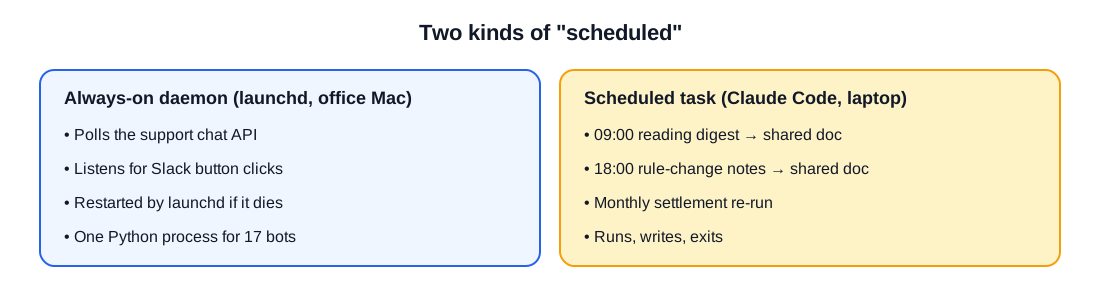
Always-on bots need a process that never exits: polling a chat API every few minutes, listening for Slack button clicks. Those run under launchd on a dedicated machine as one Python process. If the process dies, launchd brings it back. There’s no “schedule” in the Claude Code sense; it’s a daemon, and it does not sleep.
Scheduled tasks run once at a time, do a thing, and exit. A review. A document update. A one-off piece of maintenance at 3am. Those are Claude Code scheduled tasks on my laptop.
The tasks, as the scheduler lists them
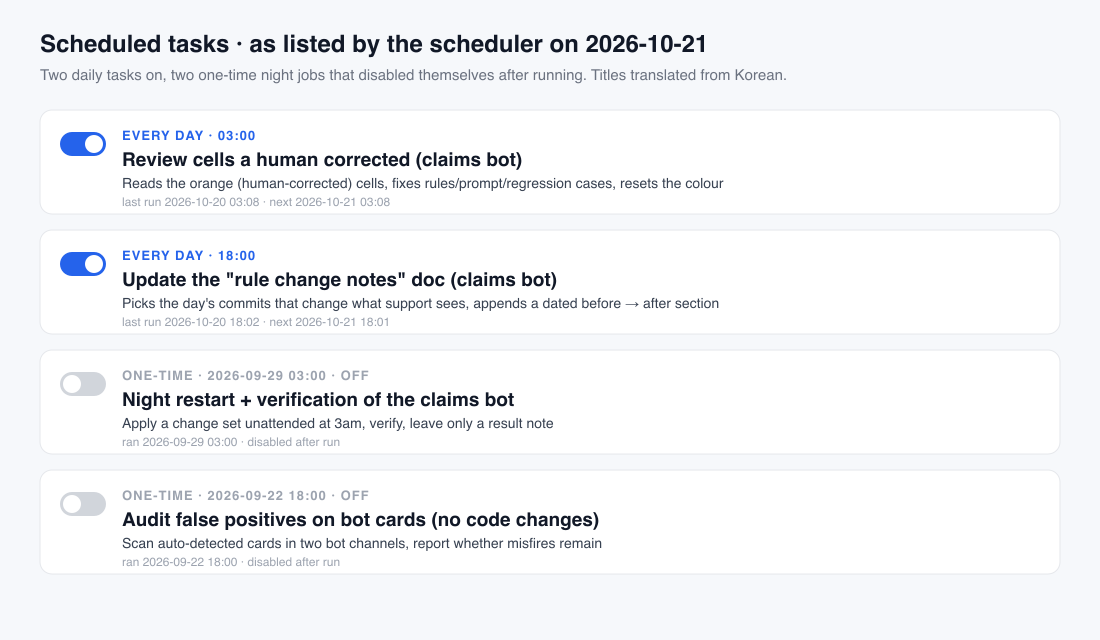
03:00 daily: review what humans corrected. The claims-logger bot writes rows; humans fix cells; the sheet colours a corrected cell orange. This task reads every orange cell from the day, works out which rule or prompt line caused the mistake, fixes it (with a regression case so it stays fixed), and resets the colour so the next night starts clean. It runs at 3am because that’s when nobody is in the sheet to witness anything.
18:00 daily: rule-change notes. Whenever the bot’s behaviour changes, the support team needs to know without reading code, because they will not read code and I respect that. This task reads the day’s commits, keeps only the changes support would notice in the sheet, and appends a dated “before → after” section to a shared document, with counts of bot rows and human corrections. The doc is the team’s changelog.
One-time night jobs. Two tasks in the list ran once and switched themselves off: a 22 September audit of false positives on bot cards (report only, no code changes), and a 29 September 3am restart that applied a change set to the claims bot, verified it, and left a result note. This is my pattern for anything risky: schedule it for 3am, give it a narrow brief, let it run unattended, read the note with coffee. Nobody’s workday gets a surprise restart in the middle of it.
Each task is a prompt plus a schedule. The prompt is the entire spec: what to read, what to write, where to put it, what “done” means.
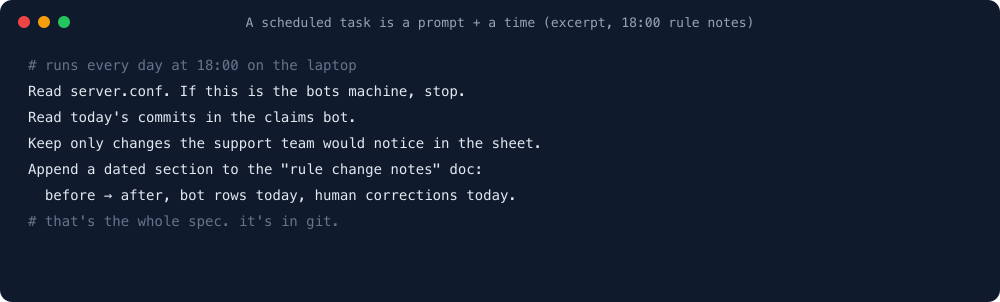
Each one lives as a small instruction file under my home directory, and I version the important ones in the repo like code, because they are code. They’re just code that reads like an email.
Why two machines, and the one-line switch
The bots live on a shared office machine. The scheduled tasks live on my laptop. That’s not elegant. It’s practical. The office machine is shared, so only the unattended daemons go there. The tasks that edit the bot’s rules and write to documents under my name run under my login.
The trap is that the same instruction file is used on both machines. So every task prompt starts with: read server.conf; if this is the bots machine, do X; if this is the laptop, do Y. One config file, one branch at the top of every prompt, one repo on two machines, and no arguments about which one is “prod”.
The failure that cost a week
Scheduled tasks on a laptop run only when the laptop is awake. This is obvious. It is written on the tin. For a week in September the 18:00 notes didn’t update anyway. The task was fine. The laptop was asleep at 18:00 because I’d taken it home and closed the lid like a normal person.
Now: the laptop stays plugged in at the office, sleep is off on power, and the first thing I check when a report is missing is the Mac’s power log, not the task. If a task absolutely must run no matter what, it belongs on the always-on machine, not with me and my lid-closing habits.
What I’d tell myself
- Separate “never exits” from “runs and exits”. Daemons go to
launchdon an always-on machine. Reviews, notes and night maintenance go to scheduled tasks. - The prompt is the spec. Version it. When the 18:00 notes changed format, the diff was in git like any other change.
- Put the output where people already look. A shared doc the team already opens beats a perfect report in a folder nobody visits.
- Risky changes get a one-time 3am task. Narrow brief, unattended run, a note to read in the morning.
- A sleeping laptop is the number one cause of “the task didn’t run”. It is never the task.
One line from me
None of this is hard. It’s the tedious, soul-sucking grunt work nobody wants to do. Hand every bit of it to the bot.